Manually Mark an Assignment as Completed

Is there a way to mark an assignment as completed to where it is_current will show as false? We are using the ProcessFormAssignmentResponse step to complete some assignments and for whatever reason they look completed but are still showing as is_current = true which is messing up some of our reports. Everything else works as expected other than the data being weird after completing the assignment.
Ideally when we use ProcessFormAssignmentResponse it would just work as expected and the completed_date_time, completed_result, etc. fields would all be filled out along with is_current being set to false. For now though I'd love a way to be able to clean these up via a flow if possible.
Here is an example of two assignments where one was completed via the form and the other completed with the step. You can see that is_current = true for the problematic one and the completed_date_time and completed_result are not set.


Maybe this is by design and we should adjust our report filters to only look at completed = true or something.
Ideally when we use ProcessFormAssignmentResponse it would just work as expected and the completed_date_time, completed_result, etc. fields would all be filled out along with is_current being set to false. For now though I'd love a way to be able to clean these up via a flow if possible.
Here is an example of two assignments where one was completed via the form and the other completed with the step. You can see that is_current = true for the problematic one and the completed_date_time and completed_result are not set.
Maybe this is by design and we should adjust our report filters to only look at completed = true or something.
0
Comments
-
Hello! This is a great question. For your use case, it seems like the "Complete Assignment in Other Flow" step would fix your issue. After pasting this step in your flow, simply select the flow that the assignment lives in. Then select the name of the assignment step. Then select the outcome path you would like the assignment to go down. Then paste the proper assignment id into the assignment id input. An example I ran on my local can be seen here:
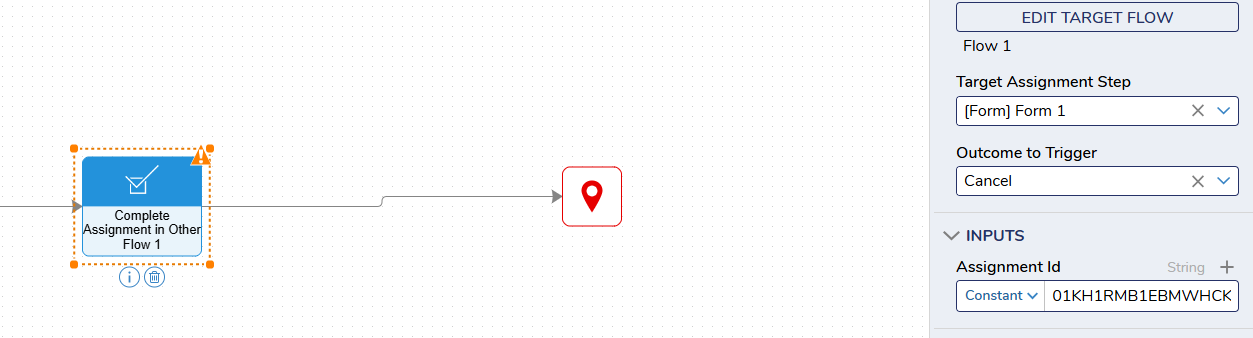
I had a flow titled "Flow 1" which created the assignment. The assignment was a form titled "Form 1". I chose for it to go down the cancel path rather than the submit path. I then pasted the assignment id that I retrieved via the query editor. After running this flow I went back to the query editor and the is_current assignment was false and the assignment was marked complete.0

Howdy, Stranger!