How to skip multiple lines on excel steps?

Comments
-
That’s a great question Luke! The way to handle this issue is to first use an Import Excel or CSV step to import the document. Within this step, under the input data, there is an input titled “Start on Row”.
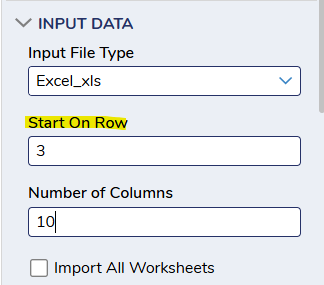
In your case, if you wanted to skip 2 rows you could start on row 3.
You can use the output of this step in any of the excel steps you plan on using such as “For Each Excel or CSV”, “Insert Row”, “Delete Row” etc. Any step that would usually allow you to only skip one line simply requires you to use this import step to start on whichever row you like.
Hope that helps!0

Howdy, Stranger!