Page performance
![[Deleted User]](https://w1.vanillicon.com/v2/13832175faaef368db7e187158c210c0.svg)
How
can I hide a page link in Decisions when a Page Visibility Rule is causing
noticeable performance delays? For context, my dashboard has many pages and has a rule that checks all of the groups that the user is in to see if they have the permissions to view one of the pages, if not, the page tab will not show, but they can still see the other pages.
0
Comments
-
Hello there,
Thank you for reaching out in our forum. The recommended approach is to continue using a Page Visibility Rule but simplify the permission checks by using Linked Groups.If the visibility rule currently checks several individual groups, you can create a single linked group that contains all groups that should have access. The visibility rule then only needs to check one group instead of evaluating each group separately, which can improve performance.To configure this:- Navigate to System > Security > Groups.- Create a new group.- Right-click the group and select Edit.- Enable Specify Linked Group.- Add the groups that should have access to the page.- Update the Page Visibility Rule to check the linked group instead of each individual group.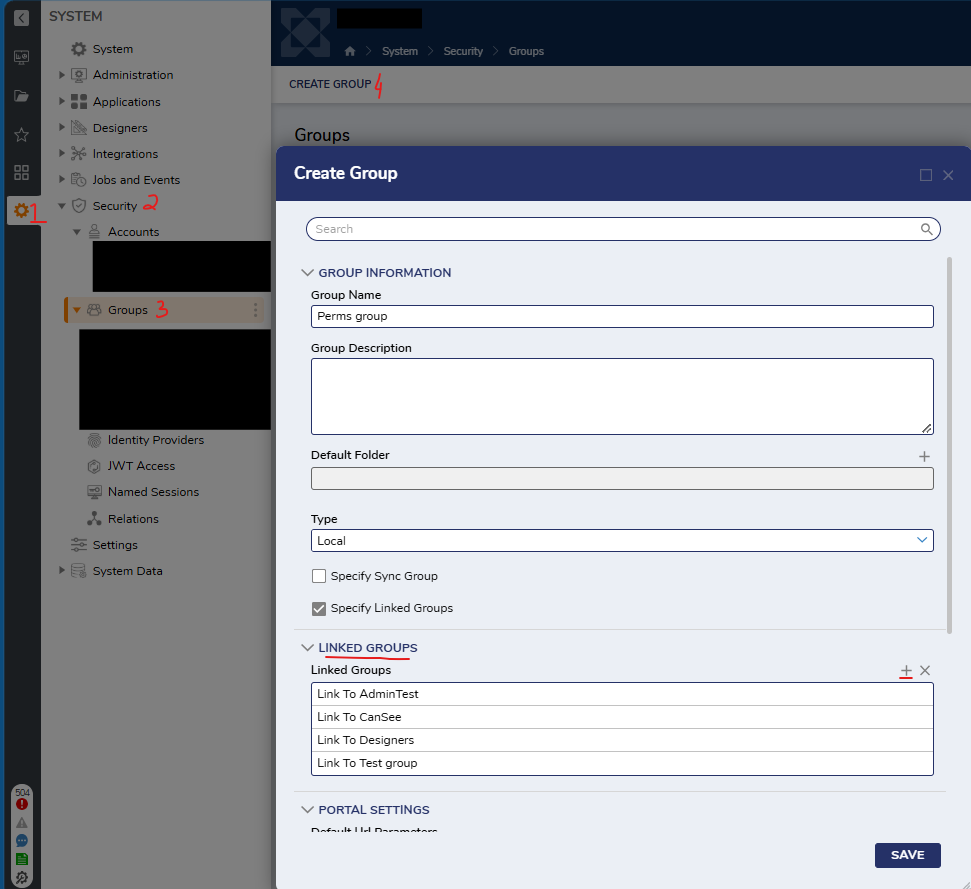 For example, if a custom page should only appear when a user cannot access the main data page, the visibility rule can check the linked group and hide the page for users who belong to one of the linked groups.JavaScript Page Controls can also be used to manipulate or hide page links in the navigation panel, but Page Visibility Rules with Linked Groups are the more supported approach for controlling page visibility.
Regards,
Vinh Tran | Decisions Support0
![[Deleted User]](https://w2.vanillicon.com/v2/24aad915403ca4009ca61883cde865c5.svg)
Howdy, Stranger!