Can't change group name
![[Deleted User]](https://w1.vanillicon.com/v2/13832175faaef368db7e187158c210c0.svg)
For
some reason, I am not able to change the name of my locally created group on
version 8. I have admin access as well and this is not an AD group.
0
Comments
-
Hey there,Thank you for reaching out in our forums! For locally created groups with current ongoing assignments assigned to them, you are not able to change the name of the group in the platform. Once these assignments are cleared, you will be able to edit the name of the group again.If changing the group name is absolutely necessary, you can do this through a flow:1. Use a Fetch Entity step to fetch the group by group Ida. You can find the group Id by navigating to System > Security > Groups > Right-click the desired group > Under Manage, hover over More > Get Group IDb.
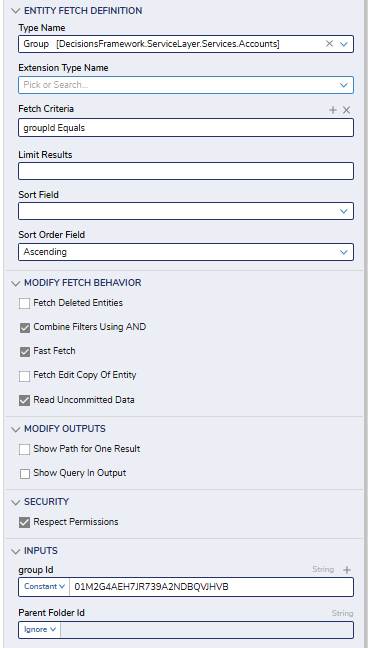 2. Add an Update Entity step and map the Results path of the Fetch Entity step into ita. Under Entity Save Definition
i. Type Name = Groupii. Entity ID to Update = EntityResults.All GroupId.First (this is okay to do as the fetch step should have only returned one unique ID)b. Under Group Informationi. Group Name = <new name>c.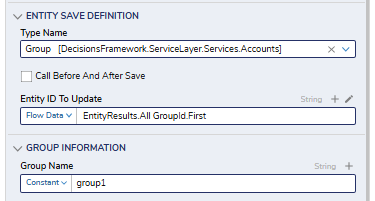 d. Leave all else empty unless you need to update other informationPlease let us know if you have any further questions!Regards,Vinh Tran | Decisions Support0
![[Deleted User]](https://w2.vanillicon.com/v2/24aad915403ca4009ca61883cde865c5.svg)
Howdy, Stranger!