Cleaning Up Unused Entities

We’re doing some cleanup in our Decisions environment. We want to:
- Find entities not linked to any project
- Identify entities that have no dependencies
- Check backup history of folder resources associated with a project
0
Comments
-
To check for unused or orphaned resources directly from the DB, try these:
- Entities not associated with any project:
SELECT ehd.id, ehd.entity_name, ehd.created_by, ehd.deleted, ehd.entity_type_name
FROM entity_header_data ehd
LEFT JOIN module_resource mr ON mr.id = ehd.id
WHERE mr.id IS NULL
AND ehd.created_by <> 'SYSTEM'
AND ehd.deleted = 0;
- Entities with no dependencies:
SELECT ehd.id, ehd.entity_name, ehd.entity_type_short_name
FROM entity_header_data ehd
WHERE ehd.deleted = 0
AND ehd.created_by <> 'SYSTEM'
AND ehd.id NOT IN (
  SELECT from_entity_id FROM module_resource_dependency
  UNION
  SELECT to_entity_id FROM module_resource_dependency
);
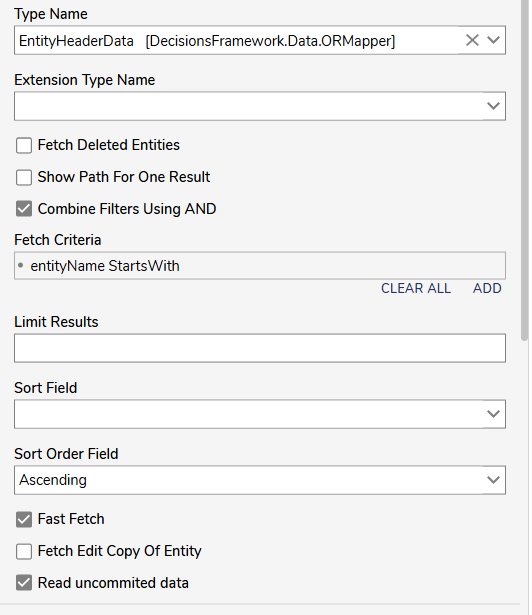
To check the backup history folders, you can use the Fetch Entities step with the data source set to
EntityHeaderData.Here’s how to configure it:
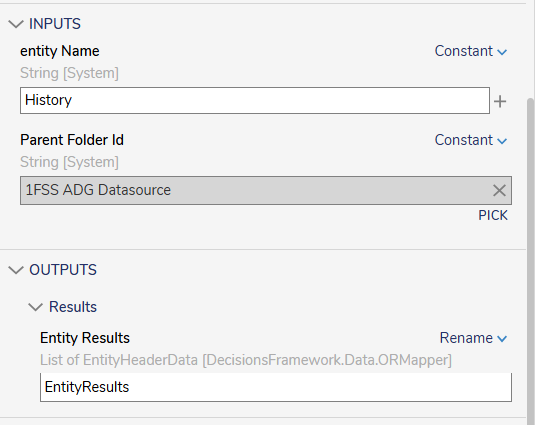
- Set the Fetch Criteria to
entityName StartsWithand pass "History" (or whatever prefix your backup folders use). - Set the Parent Folder Id to the base project folder ID.
- Leave the rest as defaults unless you want to limit or sort the results.
This will give you all
Historyfolders directly under that project.Example setup:
 0
0

Howdy, Stranger!