How to update Process Folder description once created?

I am using process folder with extension data. I would like to update the Folder Description field after the Setup Process Folder step. I find only a step "Set Process Name" under All Steps > Flow Management > Data to change the name but I don't find any step to update description.
Comments
-
The process folder's description is saved to the folder object itself, not the extension data. We can get the folder by using a Fetch Entities step and setting the fetch criteria to entityName Equals and I am passing in the name of the folder [FEE000001] John Doe's Folder. I would suggest enabling Show Path For One Result to ensure that we are only updating one folder.
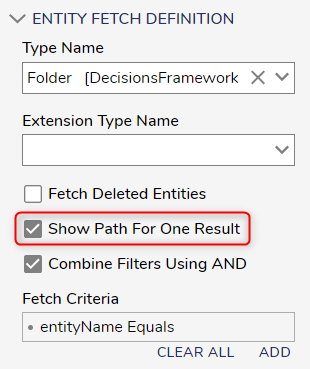
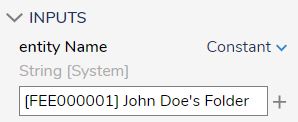
Then on the 'Result' path (not the 'Results' path), I have an Update Entity step.
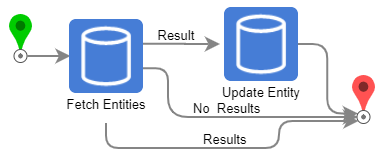
Here we will pass in the FolderID from the entity we fetched.
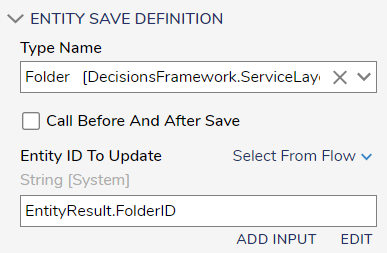
Then, find the description you would like to update and pass in your new descriptions.
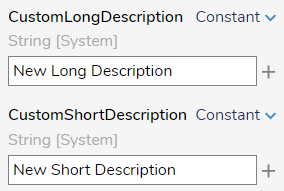
When you run this flow, the descriptions will be updated.
Please see the following documentation for additional information:
- Fetch Entities step: https://documentation.decisions.com/step-library/docs/fetch-entities-step
- Update Entity step: https://documentation.decisions.com/step-library/docs/update-entity
0

Howdy, Stranger!