Hiding the actions available on the notification popup

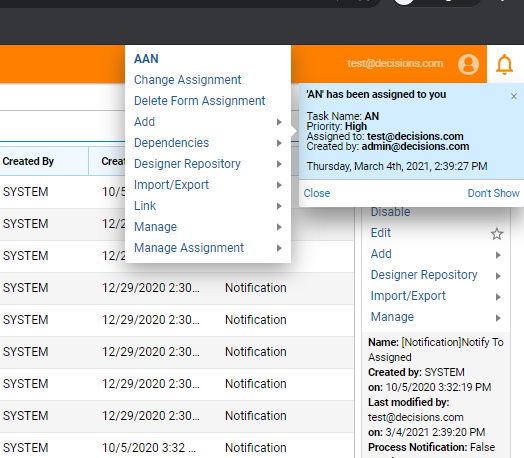
Can we hide the actions available on the notification popup for assignments?
0
Comments
-
We will have to use a Pre-Processing Flow in the NotifyToAssigned notification found at System→Administration→Notifications→Default Notifications. Please follow the below process.
- Under System→Administration→Notifications→NotificationFlows, select the AddProcessingFlow option,→enter a name for the Flow(for this case, Tekclan Test notification flow) and select Create.
- In the FlowDesigner, select the End step→change the mapping type of NotificationMessage input to BuildData→map Subject to NotificationMessage.Subject and Text to NotificationMessage.Text. Save and close the Flow.
- Under the Default Notifications folder, Edit the NotifyToAssigned notification→under NotificationFlows→check the Pre-Processing Notification checkbox→pick the created Flow→hit Save.
The actions will no longer be available on the popup.
0

Howdy, Stranger!