Open URL Link
![[Deleted User]](https://w1.vanillicon.com/v2/13832175faaef368db7e187158c210c0.svg)
Why
does an Open URL Link form control redirect users to a page showing “No data to
display…”, even though the same URL works when pasted directly into another
browser?
0
Comments
-
Hey Harvey,
Thank you for reaching out in our forum! This can occur when the Open URL Link control is configured with a full portal URL instead of using a path relative to the Decisions base URL.To resolve the issue:- Open the properties for the Open URL Link form control.- Enable Is Relative to Base.- In the URL field, enter only the path to the destination starting from the Decisions instance path rather than including the full portal base URL.For example:Primary/projects?FolderId={folderID}&pageName={pageName}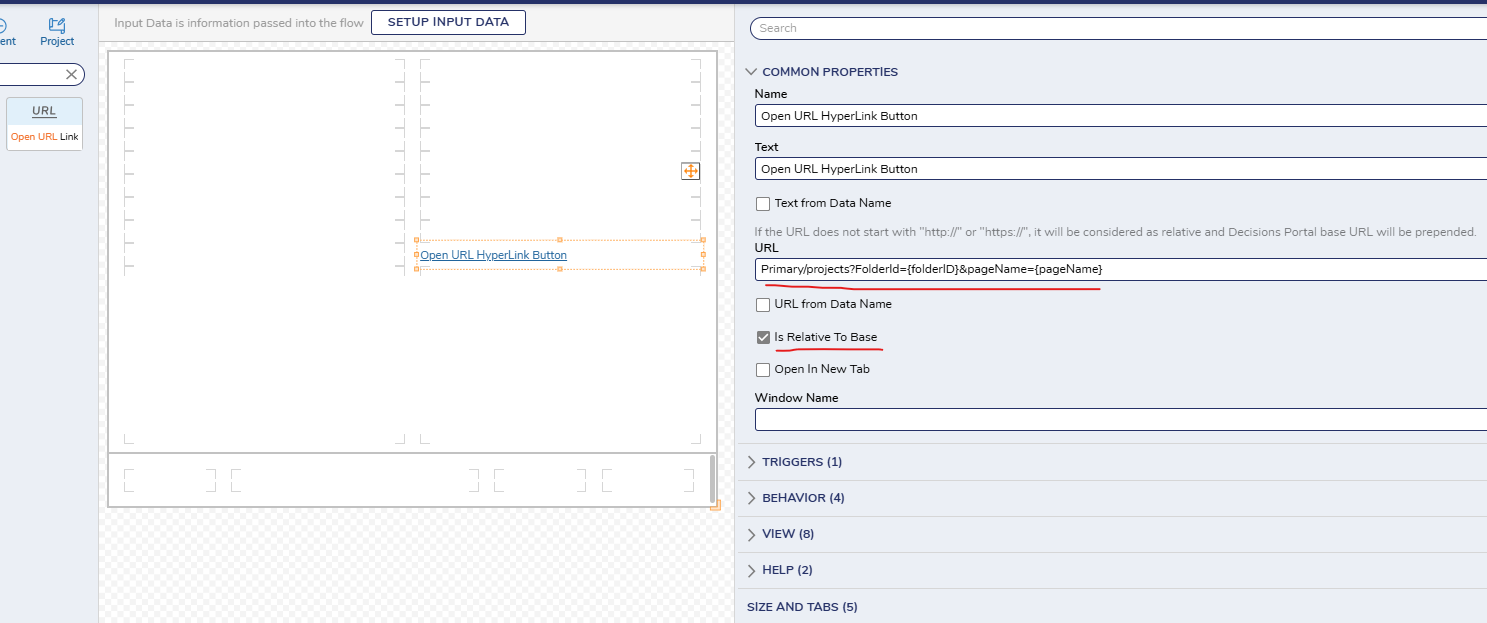 With Is Relative to Base enabled, Decisions builds the destination from the current portal base and routes the user to the intended folder correctly. This is especially useful when the same Form is accessed by different users or through different portal contexts, where a hard-coded absolute URL may not resolve as expected.
Regards,
Vinh Tran | Decisions Support0
![[Deleted User]](https://w2.vanillicon.com/v2/24aad915403ca4009ca61883cde865c5.svg)
Howdy, Stranger!