How do I add a code/ID in a header of a standard fixed-width .TXT source file?
![[Deleted User]](https://w1.vanillicon.com/v2/13832175faaef368db7e187158c210c0.svg)
Comments
-
Hello,
Thank you for reaching out to our support forum!
This can be handled in Decisions by converting the .TXT file contents into a string, using Regex Replace to replace the existing characters at the required fixed-width position, and then converting the updated string back into file data or saving it as a new text file.
The main thing to keep in mind is that the code should replace existing characters rather than insert additional characters. This keeps the fixed-width format from shifting.
Depending on how the .TXT file is introduced into Decisions, there are two possible approaches.
1. If the file is uploaded through a Form or passed in as File Data:
a. Use the Get String from UTF 8 Bytes step to convert the file bytes into a string.
b. Use the Regex Replace step.
Pattern:
^(.{5}).{9}
Replacement:
${1}A1B2C3D4
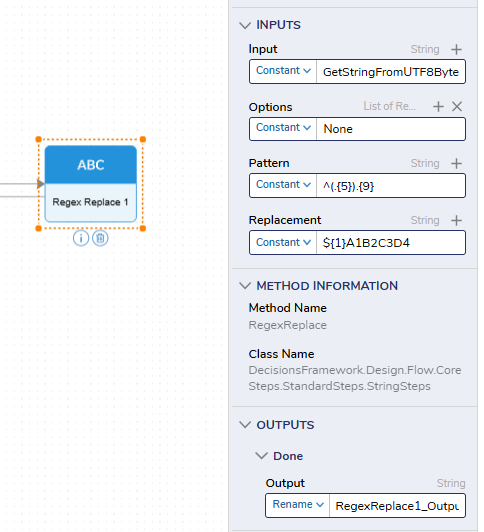
c. Use the Get UTF 8 Bytes from String step to convert the updated string back into bytes.
d. Use the resulting file data to download the updated file through a Form or create a new text file.
2. If the file is saved in a Decisions server directory:
a. Use the Read Text File step.
Example path:
C:\Program Files\Decisions\Decisions Server\outputted txts\sample_Source.txt
b. Use the Regex Replace step with the same configuration:
Pattern:
^(.{5}).{9}
Replacement:
${1}A1B2C3D4
c. Use the resulting file data or use the Create File step to save the updated file to the desired location.
Example output path:
C:\Program Files\Decisions\Decisions Server\formatted txts\sample_withCode.txt
In the Regex pattern, ^(.{5}).{9} starts at the beginning of the file, keeps the first 5 characters, and replaces the next 9 characters with 671806SYA. The ${1} value preserves the first 5 characters so the rest of the fixed-width file does not shift.
Regards,
Vinh Tran | Decisions Support
0
![[Deleted User]](https://w2.vanillicon.com/v2/24aad915403ca4009ca61883cde865c5.svg)
Howdy, Stranger!