Change date of current status on Folder Activity Panel
![[Deleted User]](https://w1.vanillicon.com/v2/13832175faaef368db7e187158c210c0.svg)
Hi I have a folder activity panel in my page, I recently had to go back and change something, but now the date on
the 'Completed' status banner for my folder has updated, is there a way that I
can change this as I want to keep the original completed on date.


0
Comments
-
Hello there Harvey,Thank you for reaching out to support! This action is definitely possible if you perform the following steps:1. These are the values you would need to grab before startinga. Folder ID of where the page with the Folder Activity Panel is held (i.e '1b58c4d4-7006-11ea-ba79-0433c21fd9a3')
i. Can be found by right-clicking the folder > Other > Get Designer Folder IDb. The Entity Name of the item you want to update as it appears in the folder (i.e '[WF000005] Test Example Lab'), this is to help narrow it down2. Create a new flow3. Add a 'Fetch Entity' stepa. Type name = 'Folder [DecisionsFramework.ServiceLayer.Services.Folder]'b. Fetch Criteriai. FolderID Equalsii. EntityName Equalsc. INPUTSi. Map in the values collected in step 1 for 'entity Folder ID' and ‘entity Name’- This is to help narrow down the selectionsii. Leave 'Parent Folder Id' on ignore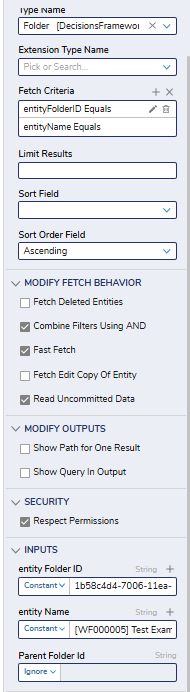
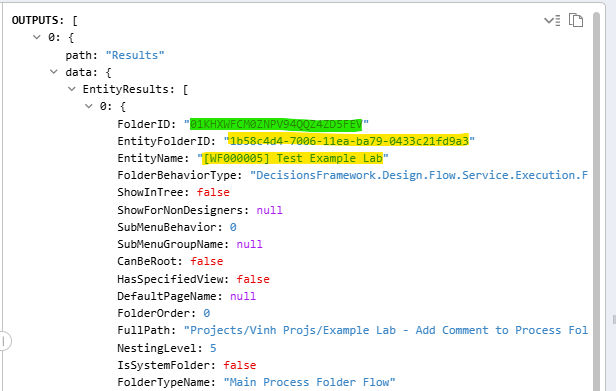 4. Make note of the 'FolderID' value highlighted in green as it will be needed5. Add another 'Fetch Entity' step and connect the previous fetch step to ita. Type Name = 'FolderState [DecisionsFramework.ServiceLayer.Services.Folder]'b. Fetch Criteriai. entityFolderID Containsc. INPUTSi. Map in the 'FolderID' in step 4 into 'entity Folder ID'ii. Leave 'Parent Folder Id' on ignore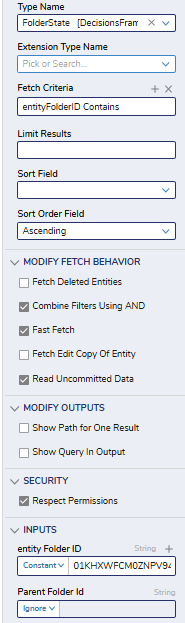
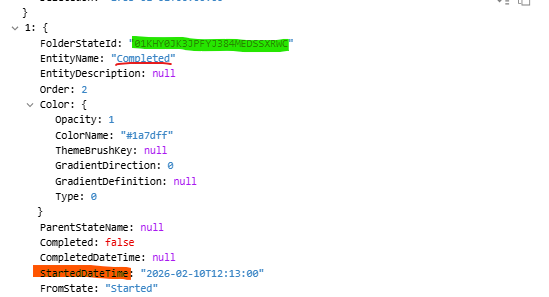 6. In your output, scroll down to where 'EntityName' is 'Completed' (or whichever state you want to update) and make note of the value highlighted in greena. Value highlighted in orange is the value that you will change in the next step7. Add an 'Update Entity' stepa. Type Name = 'FolderState [DecisionsFramework.ServiceLayer.Services.Folder]'b. Entity ID to Update = The value you made note of in GREEN in step 6c. Scroll down to 'StartedDateTime' and updated. Leave everything else on IGNORE8. Verify that change is made, and delete the flowRegards,Vinh Tran | Decisions Support0
![[Deleted User]](https://w2.vanillicon.com/v2/24aad915403ca4009ca61883cde865c5.svg)
Howdy, Stranger!