Empty File Upload by User
![[Deleted User]](https://wa.vanillicon.com/v2/a956ae5b01d02b69dd349bcd60564717.svg)
How can I determine if a user uploaded an empty file?
Comments
-
Hi there!
Reading a file depends on the file type.
For CSV and Excel files, you can use a ‘CSV to List Mapping’ step or an ‘Import Excel or CSV’ step and then verify that the output is not empty.
For Word or PDF documents, you can use a ‘Recognize Text from Document’ step and then verify that the output is not empty.
Here are some related links for more information on each of these steps.
CSV to List Mapping: https://documentation.decisions.com/step-library/docs/csv-list-mapping-step
Import Excel or CSV: https://documentation.decisions.com/step-library/docs/import-excel-or-csv-step
Recognize Text from Document:
https://documentation.decisions.com/step-library/docs/recognize-text-from-word-doc-step
https://documentation.decisions.com/step-library/docs/recognize-text-from-pdf-step
Let’s take a look at one of these options to see it in action.
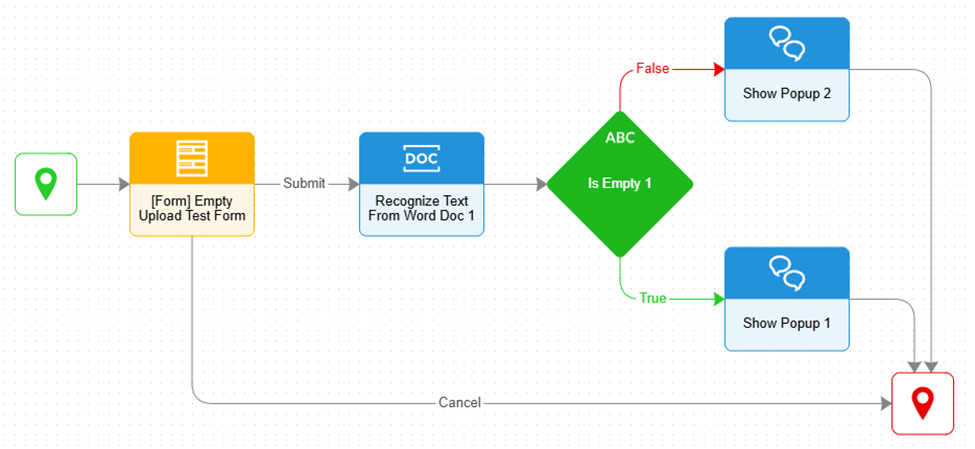
I chose to select my file using the ‘Show Form’ step with a file upload component. Next, add the ‘Recognize Text From Word Doc’ step and INPUT my uploaded file. Then, I used the ‘Is Empty’ step to determine if the file is empty or not. Based on the results, choose what next steps you want to take from here. In my example, I chose to display a pop-up using the ‘Show Popup’ step for each outcome.
All the best,
Tracey | Decisions Support
0
![[Deleted User]](https://w0.vanillicon.com/v2/0c580e728ff6a0ec9dea1bae73a60f64.svg)
Howdy, Stranger!