How do I retrieve the 'Completed Form' on an assignment in my flow?
![[Deleted User]](https://w1.vanillicon.com/v2/13832175faaef368db7e187158c210c0.svg)
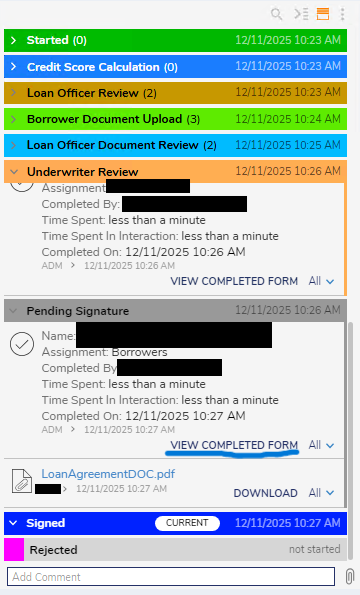
I’m trying to figure out how to grab the image that shows up when you click “View Completed Form” on an Assignment. Is there a step in Decisions that lets me pull that image?
What I want to do is take that completed-form image, turn it into file data/reference, and then show it in a document viewer so the user can download or print it.
Comments
-
Hi there,
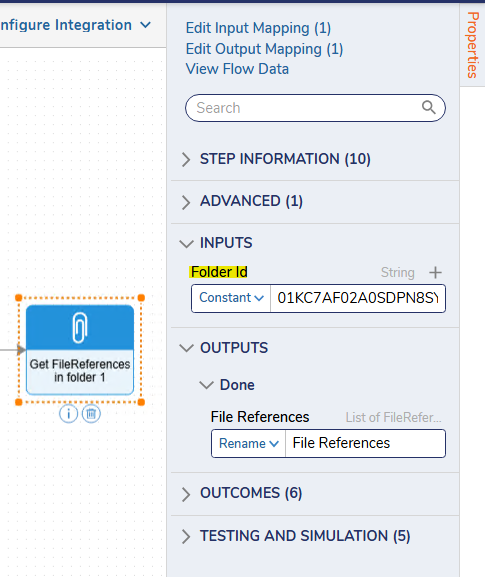
Thank you for bringing this to our attention! If these completed forms are file reference entities in your case entity process folder and can be retrieved using the 'Get FileReferences in folder' step. Completed forms are not automatically saved as file reference entities and must be explicitly saved in the process folder (can be done by using the 'FileReferenceService' service and 'CreateEntityFromFileReference' method).
In the 'Get FileReferences in folder' step, you are prompted to pass in the folder ID, where the file reference entity is held.
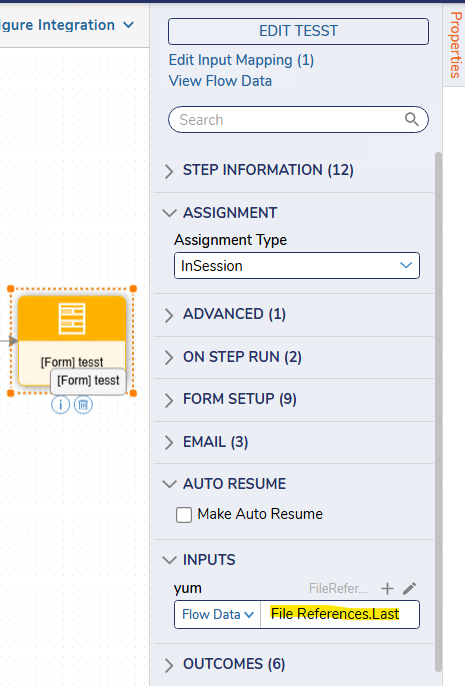
From here, you can add a 'Show Form' step, pick the form that has Document Viewer configured to take in File Reference and give it a data name and pass in the output in the previous step in the 'Show Form' step properties. If there are multiple, assuming that the completed form is the most recent and explicitly saved in the process folder, should be the last in the array.
Regards,
Vinh Tran | Decisions Support
0
![[Deleted User]](https://w2.vanillicon.com/v2/24aad915403ca4009ca61883cde865c5.svg)
Howdy, Stranger!