Phone info step??
![[Deleted User]](https://w1.vanillicon.com/v2/13832175faaef368db7e187158c210c0.svg)
Are there any steps in Decisions to manage phone number info or the Phone Detail Property in Account?
Comments
-
Hey there,
Thank you for reaching out in Decisions Forum! You can manage phone number information with our 'Call Internal Decisions Service' step under Integration > Internal Services in the toolbox. In the properties of this step, when selected, will prompt you with the service name and method name.
For your specific use case, would be the 'ContactInfoService', which would come with methods for creating, updating, and deleting element registrations, as well as retrieving element usages and managing folder configurations. To retrieve existing contact info, you can use the method 'GetAllContactInfoForOwner' if you have the ownerId (same as accountId) readily available. If you need to add Phone Number(s), you can use the method 'AddPhoneToContactInfoInFolder', where you will be prompted to add the phone number and the folderId (ownerId).
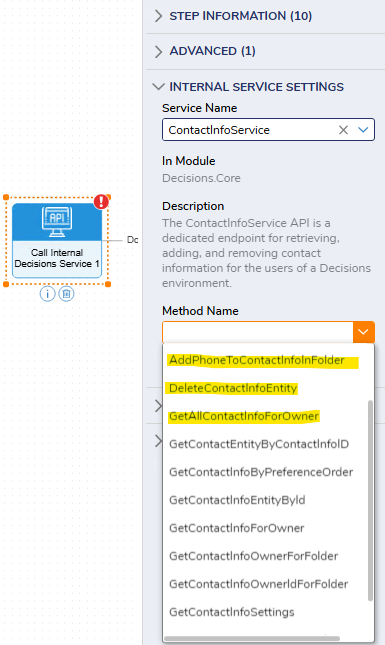
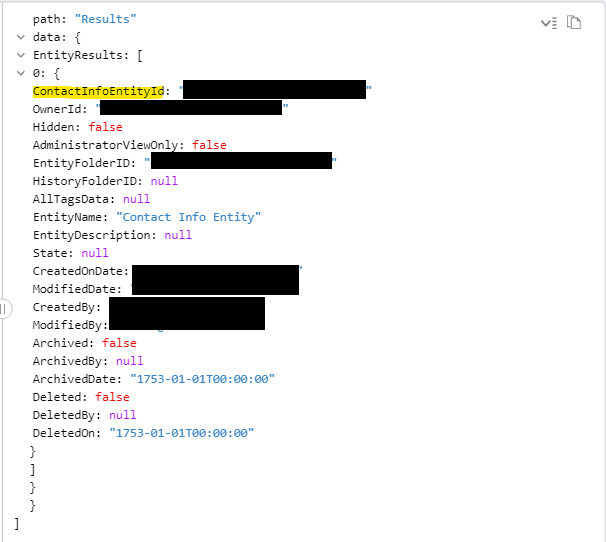
To delete contact information, you can use the method 'DeleteContactInfoEntity', for this you will need the ContactInfoEntityId, which you can use the Fetch Entities step for Type Name 'ContactInfoEntity' with the criteria of ownerId equals to the desired user's accountId or ownerId. This will return the user's ContactInfoEntityId along with other information.
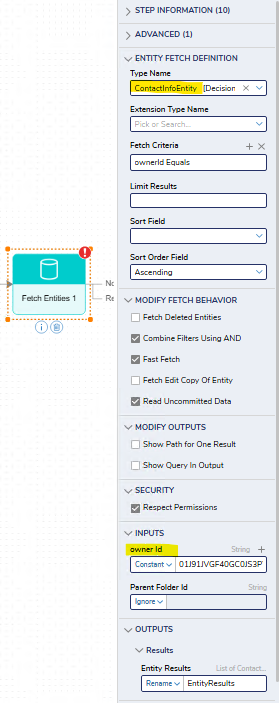
Fetch Results
Regards,
Vinh Tran | Decisions Support
0
![[Deleted User]](https://w2.vanillicon.com/v2/24aad915403ca4009ca61883cde865c5.svg)
Howdy, Stranger!