How can you trigger a notification upon an automated scheduled job failing?
![[Deleted User]](https://w7.vanillicon.com/v2/7bfb6b4b2a0cac504107abf6704a84e3.svg)
I have a Flow that needs to alert the end user when an automated job fails to run. Is there a way to configure this?
Comments
-
Hi there,
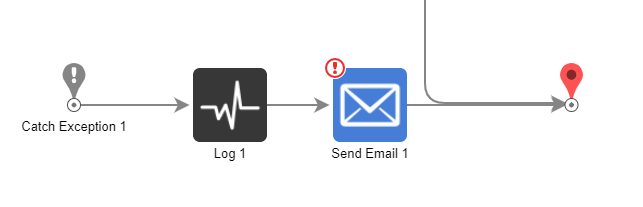
One solution that may work for your needs is utilizing a Send Email step within the job Flow. Upon reaching an exception, an email can be sent to a user that notifies the end user that an automated job has failed.
Here is some documentation on the Send Email step:
https://documentation.decisions.com/step-library/docs/send-email?highlight=Send%20Email
In addition, you can include a Log step on the exception path that captures the error message associated with the failing of the automated job.
Here is some documentation on the Log step:
https://documentation.decisions.com/step-library/docs/log?highlight=Log
Hope this helps!
0
![[Deleted User]](https://w0.vanillicon.com/v2/0cfb28ebfff7e2d996a5afdc187c8ca5.svg)
Howdy, Stranger!