Show folders in favorites for every user

Comments
-
Hello Harvey,
Thank you for reaching out in our forum. To make a global favorite folder that shows up for "All Users" in the Favorites tab in version 8.18:
1. Any account created should already be in the 'All Users' group
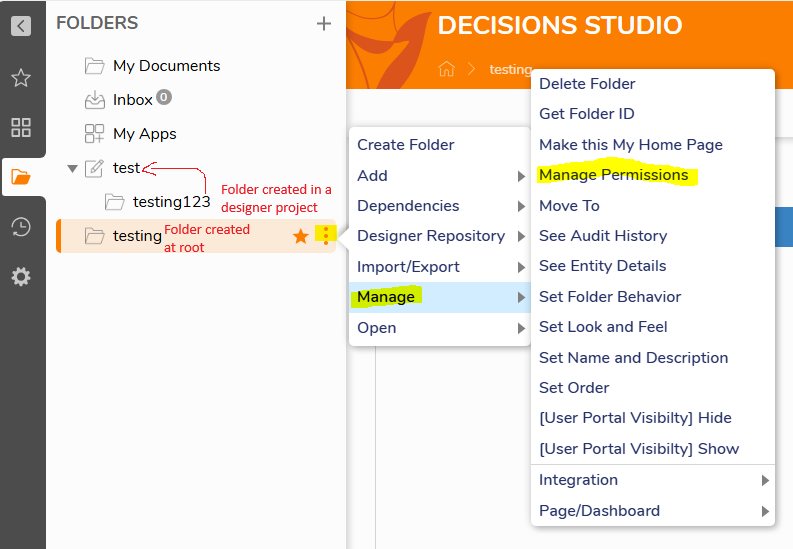
2. Go to your designer project and select the desired folder you want favorited globally (with the folder icon) OR create a folder (not a designer project) either at root or within the project.
3. Hover over the folder, click on the ellipses or right-click > Manage > Manage Permissions
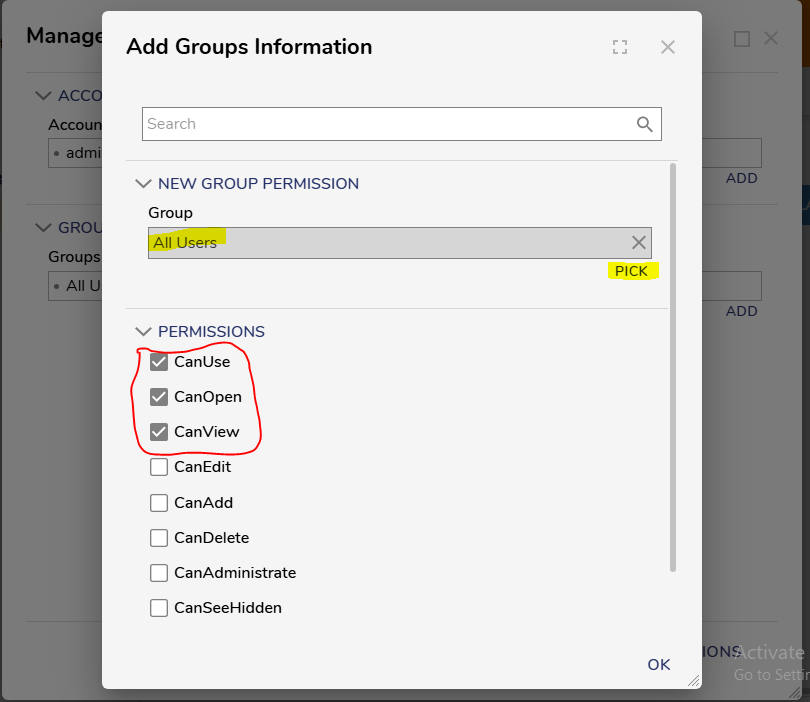
4. Add Group
a. Pick 'All Users' group
b. Give the following permissions
i. CanUse
ii. CanOpen
iii. CanView
c. Save Permissions
5. Hover over the selected folder again, click on the star button
6. Navigate to the favorites tab on your admin account
7. Hover over the folder you have just favorited
a. Click on the star button
b. Select 'For All Users'
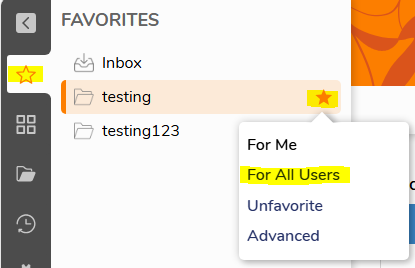
The steps above works for both folders created at root and folders created under designer projects.
Sincerely,
Vinh Tran | Decisions Support
0

Howdy, Stranger!