Display order doesn't match serialization order

Comments
-
In addition to this, sometimes changing the display order will reverse the order of the properties, or adding custom attributes but I have no way to control or predict what the change will be
0 -
[color=#1d1c1d]Hello,[/color]
[color=#1d1c1d]
[/color]
[color=#1d1c1d]I want to inform you that unfortunately, we cant really control the order of the fields of the data structure in the flows. The order defined in the data structure only applies to how the fields are displayed when we view the data structure.[/color]
[color=#1d1c1d]
[/color]
[color=#1d1c1d]Regards[/color]
[color=#1d1c1d]Osman Zama[/color]0 -
I think I may have found way around this, When I changed the display order it did change the order of the properties. If I had to guess, I would assume the most recent updated properties first on the order. Anyway, I changed the display order of all the properties from the last property to the first that I wanted. After saving, there was no change but a few hours later the order did change. I do not know why this worked but it did
0 -
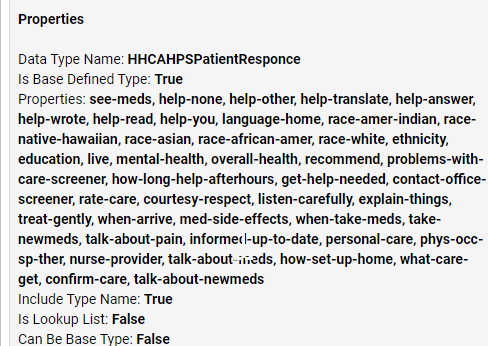
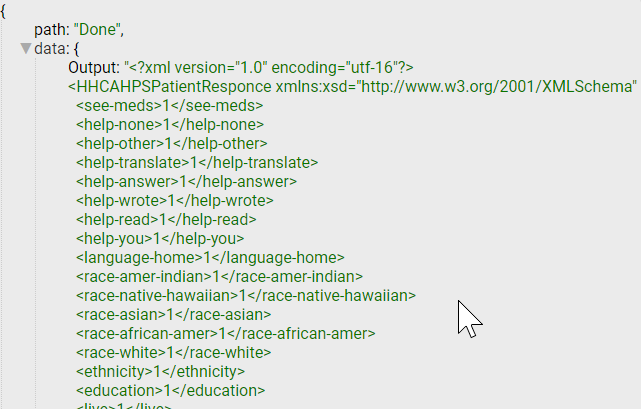
I am not sure whether to put this in the datatypes form or this one, but I know about changing the display order in setting in the datatypes, but that doest effect the order of the attributes in the datatype when I serialize it into XML.

 34124
34124