How to apply a hotfix?

Comments
-
Hi Harvey,
Thank you for reaching out in our forums! If Dev is your authoring environment and Trunk contains newer changes that should not yet be promoted, you can temporarily switch the project in Dev from Trunk to the branch currently deployed in Stage.
1. Make sure all current Trunk changes are checked in, and no one is actively editing the project.2. In Dev, navigate to System > Designers > Repository.
3. Right-click the applicable Project and select Change Branch.
a.
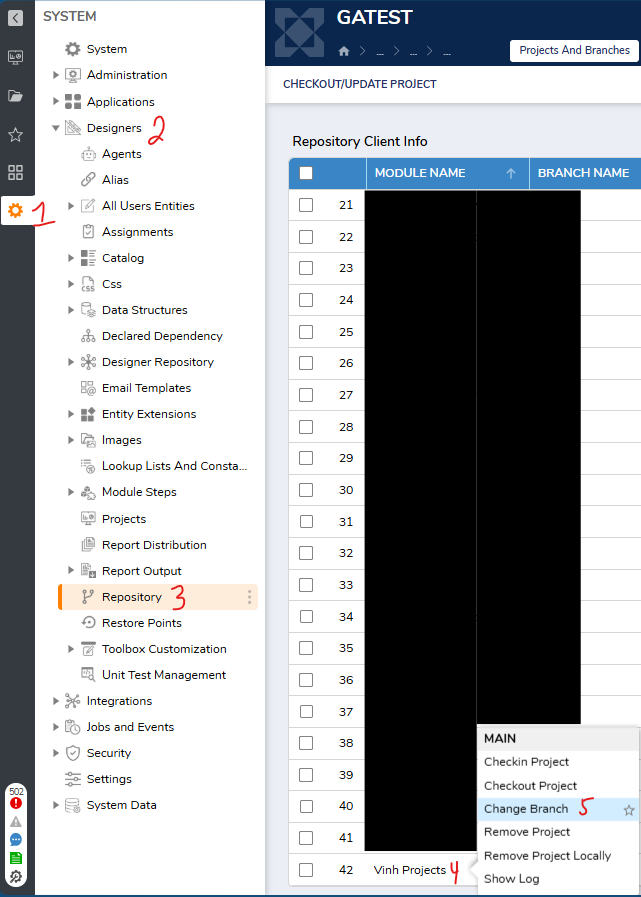
4. Change from Trunk to the branch currently deployed in Stage.
5. Check out the branch, make the required fix, and check the changes back in.
6. In Stage, check out the updated branch to deploy the fix.
7. Once complete, switch the Dev project back to Trunk by following steps 2 & 3, and then check out the latest Trunk revision.
8. Apply the same hotfix back to Trunk, either by merging the specific hotfix revision or recreating the change there, so it is included in future deployments.
This approach allows a targeted fix to be made to the deployed branch without introducing unrelated work that is still in progress on Trunk.
Using the Repository
Regards,
Vinh Tran | Decisions Support
0

Howdy, Stranger!